Shelf Frame Stopper Mockup: A Strategic Tool for Visual Merchandising and Brand Communication
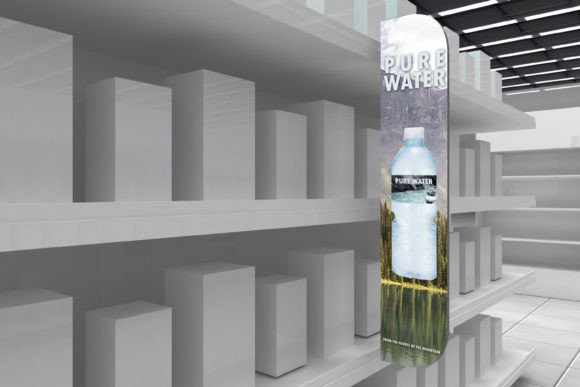
Visual presentation plays a critical role in retail environments, marketing campaigns, and brand positioning. The Shelf Frame Stopper Mockup offers a practical, high-quality solution for designers, marketers, and business owners who want to visualize product displays before committing to print or production. This mockup simulates how shelf frame stoppers—those small but impactful signage elements placed between products on retail shelves—will appear in real-world settings. By allowing users to insert their designs into a professionally crafted visual model, it streamlines decision-making and enhances creative confidence.
Why the Shelf Frame Stopper Mockup Matters for Retail and Marketing
In fast-moving retail environments such as supermarkets, grocery stores, and malls, shelf frame stoppers serve as attention-grabbing tools that guide consumer choices at the point of purchase. These small signage pieces can influence buying behavior by highlighting promotions, new products, or exclusive offers. However, producing them without a clear visual preview can lead to costly mistakes in layout, color, or messaging.
The Shelf Frame Stopper Mockup addresses this challenge by offering a digital preview that mimics the physical placement of these stoppers on shelves. With a resolution of 3000×2000 pixels and layered PSD files, it provides a realistic and editable environment for testing visual concepts. This enables designers and marketers to evaluate how their branding elements will appear in context before moving forward with print runs or in-store installations.
Supporting Strategic Planning and Brand Consistency
Using the Shelf Frame Stopper Mockup isn’t just about aesthetics—it’s a strategic step in ensuring brand alignment and communication clarity. When launching a new campaign or product line, consistency across all touchpoints is essential. The mockup allows teams to test how stopper designs integrate with broader marketing assets, store layouts, and existing brand guidelines.
- Test font legibility at shelf-level viewing distances
- Simulate color contrast against different product backgrounds
- Preview how promotional messages appear in real retail settings
These capabilities support better planning and decision-making, especially when time and budget constraints are tight. By visualizing stopper designs in advance, brands can avoid costly revisions and ensure that every element of their retail presence supports their strategic messaging.
When and How to Use the Shelf Frame Stopper Mockup
The Shelf Frame Stopper Mockup is particularly useful during the early stages of a marketing campaign or product launch. Whether you're designing for a single store display or a national rollout, this tool helps you refine your visual approach before investing in physical materials.
- Start with your design assets: Ensure your artwork is prepared in the correct format (e.g., high-resolution PNG or JPEG).
- Open the PSD file in Photoshop CS5 or later: Navigate to the Smart Object layer to insert your design.
- Adjust lighting and filters: Use the built-in photo filters and light/contrast controls to match your intended environment.
- Review and refine: Evaluate how your stopper appears in context and make necessary adjustments before finalizing.
By following this structured approach, professionals can ensure that their visual mockups accurately reflect the intended real-world application, reducing the risk of misaligned expectations or poor execution.
Strategic Considerations for Effective Use
While the Shelf Frame Stopper Mockup is a powerful tool, its effectiveness hinges on how it's used within a broader strategic framework. Before diving into design adjustments, consider the following:
- What is the goal of the stopper? Is it to promote a sale, highlight a new product, or reinforce brand identity? Each objective may require a different visual approach.
- Who is the target audience? Design choices should reflect the preferences and expectations of the shoppers who will encounter the stopper.
- How does it fit into the overall in-store experience? Ensure that the stopper complements other signage, product placements, and lighting conditions.
By aligning the use of the mockup with these strategic questions, professionals can create more impactful and cohesive retail experiences that resonate with customers and support business objectives.
Maximizing Creativity and Productivity
One of the most valuable aspects of the Shelf Frame Stopper Mockup is its ability to enhance both creativity and productivity. Designers can experiment with multiple versions of a stopper quickly and efficiently, allowing for rapid iteration and refinement. This flexibility is especially useful in time-sensitive campaigns where speed and accuracy are critical.
Additionally, the organized layer structure and clear naming conventions in the PSD files make it easy for teams to collaborate effectively. Whether you're working solo or with a group, the mockup streamlines the review and approval process, reducing back-and-forth communication and accelerating time-to-market.
Avoiding Common Pitfalls
Despite its advantages, the Shelf Frame Stopper Mockup should not be used in isolation or without a clear strategic context. Some common risks include:
- Over-relying on the mockup without validating the design in real environments
- Using the tool without understanding the target audience or retail context
- Skipping the planning phase and jumping straight into design adjustments
To avoid these pitfalls, always treat the mockup as a part of a larger planning and execution process. Use it to support informed decision-making rather than as a substitute for real-world testing or customer feedback.
Long-Term Value and Practical Application
For businesses and creatives involved in retail marketing, the Shelf Frame Stopper Mockup offers long-term value beyond individual campaigns. By maintaining a library of mockup-ready templates and design assets, organizations can streamline future projects and maintain consistency across multiple product lines and store locations.
Moreover, the mockup can serve as a training tool for junior designers or marketing team members who are learning how to approach in-store visual communication. Its structured format provides a clear framework for understanding how design choices translate into real-world impact.
Conclusion: Using the Mockup with Intention
In summary, the Shelf Frame Stopper Mockup is more than just a design tool—it’s a strategic asset for anyone involved in retail marketing, brand communication, or visual merchandising. When used intentionally, it supports better planning, clearer communication, and more confident decision-making. Whether you're launching a new product, redesigning your store layout, or preparing for a seasonal campaign, this mockup empowers you to visualize success before it hits the shelves.